








If you run a hotspot or ISP business, you already know the billing system can either make your life easier or turn every day into a headache.
A good system should help you collect payments, manage users, and keep things moving without forcing you to babysit the network all day. That is exactly why billing software matters more than most people think.
I have used Centipid Billing System for more than two years, long enough to see the good, the bad, and the bits that only show up after real-world use.
Not after a quick demo. Not after one smooth setup in a test environment.
I mean actual use, in the middle of day-to-day network work, client complaints, payment issues, and the usual chaos that comes with running internet business in the real world.
This review is my honest experience.
No sugar-coating. No fake hype.
Just a practical look at what Centipid does well, where it saves time, where it gets annoying, and whether it is still worth using in 2026.
Centipid Billing System is a cloud-based platform that helps internet service providers (ISPs), WiFi hotspot operators, apartment networks, schools, hotels, and other network businesses manage customers, payments, and internet access from one place.
Instead of manually activating users or disconnecting accounts that have expired, Centipid automates much of the process.
One thing many beginners misunderstand is what a billing system actually does.
It doesn’t replace your MikroTik router or manage your network infrastructure.
Your MikroTik still handles routing, firewall rules, bandwidth management, VLANs, queues, VPNs, and network security. Centipid works alongside it by authenticating users, managing subscriptions, processing payments, generating invoices, and deciding who should have internet access based on their account status.
Think of it this way. If your MikroTik is the engine of your ISP, Centipid is the receptionist.
It keeps customer records, receives payments, renews subscriptions, and tells the router who should be connected and who shouldn’t. Each has a different job, but both are essential if you want to run your business efficiently.
Over the past few years, Centipid has become a popular choice among small and medium-sized ISPs, especially in Kenya.
One reason is its support for local payment methods like M-Pesa, which makes it easier for customers to pay and get connected almost instantly. For operators who don’t want to build their own billing platform or manage a complicated server, it offers a straightforward way to automate daily operations.
When I started WiFi Mtaani, I needed a billing system that could automate the repetitive work.
I didn’t want to manually activate users, track payments, or disconnect expired accounts every day. As the number of customers grew, that approach simply wasn’t sustainable.
My checklist was straightforward. The system had to work well with MikroTik, support M-Pesa payments, automate user management, and be simple enough to use without spending hours on training or maintenance.
I looked at several billing systems before settling on Centipid.
It offered the features I needed, the setup looked manageable, and it was already gaining traction among ISPs in Kenya. The free trial also gave me enough time to test it before making a commitment.
Looking back, it was the right choice. It wasn’t perfect, but it solved the biggest problems I was facing and gave me a solid foundation to grow the business.
Run your hotspot with a stable billing system, an elegant captive portal, self-service onboarding and powerful PPPoE management.
Start Your 14-Day Free Trial
Setting up Centipid was easier than I expected. The documentation covered most of the basics, and I had the system connected to my MikroTik without too much trouble. If you’ve worked with MikroTik before, the setup should feel familiar.
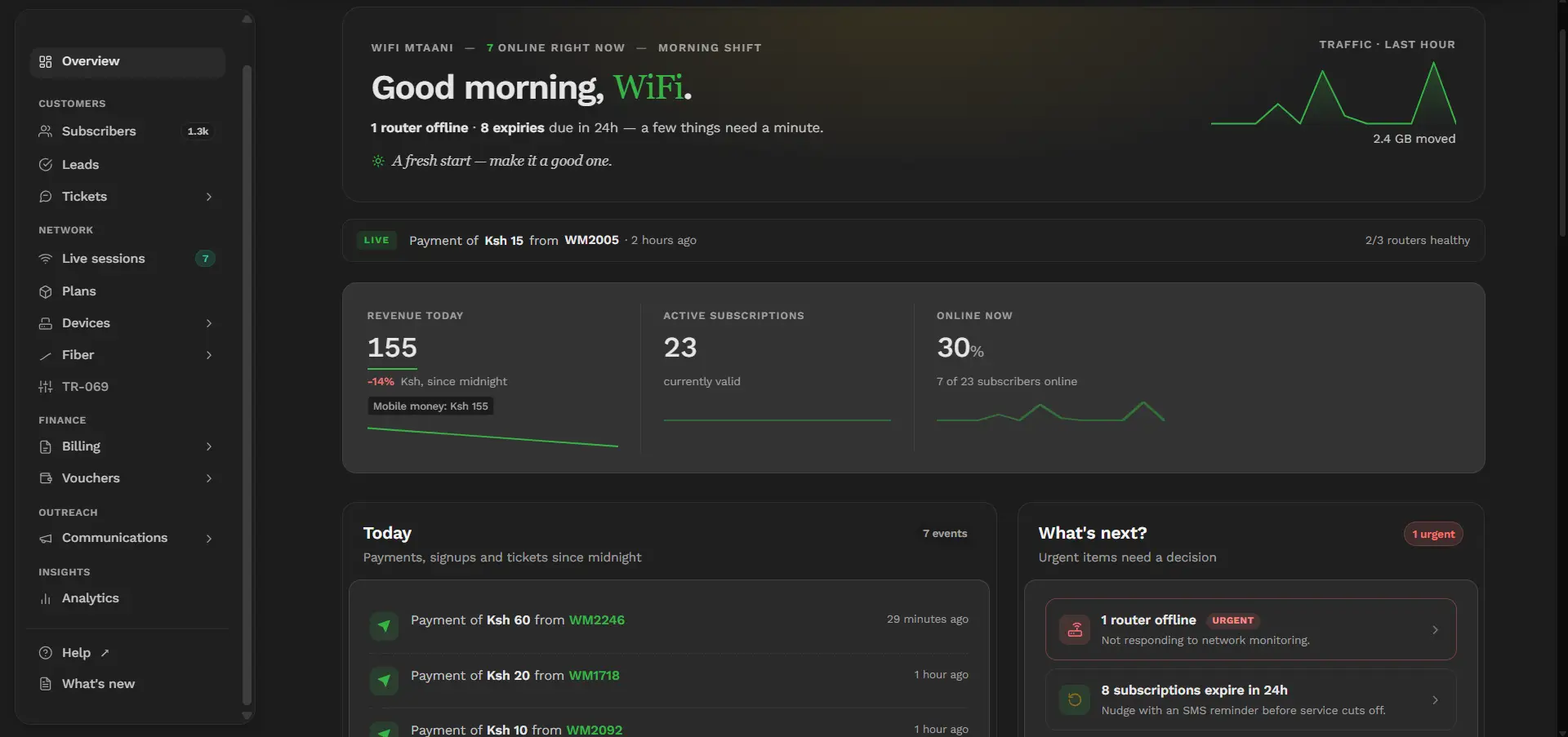
The dashboard looked clean and organized. Most of the common tasks, such as managing users, creating packages, checking payments, and viewing active sessions, were easy to find. I didn’t spend much time searching through menus.
The learning curve was fairly short. After a few days, I could manage customers, monitor subscriptions, and handle routine tasks without referring to the documentation.
That said, not everything was obvious. Some settings needed a bit of trial and error before I understood how they worked. I also found that a few advanced features lacked detailed explanations, so I had to learn by experimenting.
Overall, my first impression was positive. Centipid felt like software built by people who understand how ISPs operate. Instead of trying to do everything, it focused on the features most operators use every day.
After using Centipid for more than two years, I’ve found myself relying on a handful of features almost every day. These are the tools that keep the business running with minimal manual work.
User Authentication
This is the core of the platform. Once a customer pays, Centipid automatically authorizes their account and allows them online. When their subscription expires, access is revoked automatically. That alone saves a lot of time.
Billing and Payments
M-Pesa integration is one of Centipid’s biggest strengths. Customers can pay using their phones, and in most cases their accounts are renewed automatically. It reduces support calls and eliminates the need to manually confirm every payment.
Customer Management
Adding new users, updating packages, extending subscriptions, and suspending accounts only takes a few clicks. The customer database is easy to navigate, making it simple to find an account when someone calls for support.
Package Management
Creating internet packages is straightforward. You can define prices, validity periods, speeds, and other settings without editing MikroTik configurations every time you introduce a new plan.
Monitoring
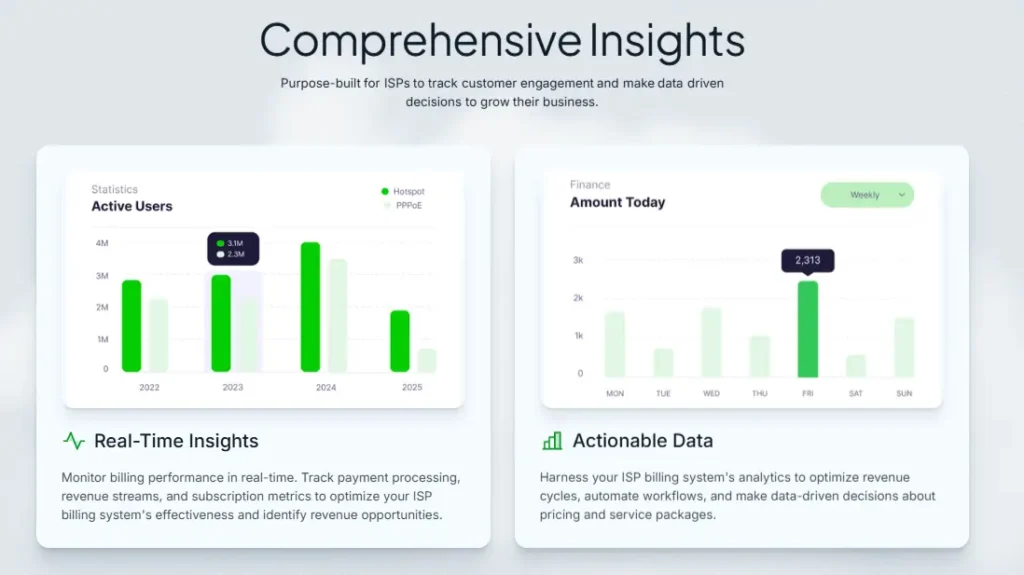
The dashboard gives a quick overview of active users, online sessions, and recent payments. I regularly use it to confirm whether a customer is online before troubleshooting other possible issues.
Reporting
Centipid includes reports for payments, subscriptions, and customer activity. While I don’t use every report available, the sales and payment reports are useful for tracking daily collections and monitoring business performance.
Centipid gets the basics right. It automates the tasks that consume the most time, which means you spend less time managing accounts and more time growing your business.
The M-Pesa integration works well. Customers pay, the system processes the payment, and their internet is restored automatically. That reduces delays, cuts down on support calls, and gives customers a better experience.
It also simplifies customer management. Whether you’re adding a new user, changing a package, or checking an account, everything is accessible from one dashboard. You don’t have to jump between multiple tools for routine tasks.
Reliability is another strong point. Over the past two years, the system has been stable enough that I rarely think about it. That’s exactly what you want from billing software. If you’re constantly checking whether your billing system is working, something is wrong.
Another thing I appreciate is that Centipid doesn’t try to replace your MikroTik. It focuses on billing, payments, and customer management while leaving routing, firewall rules, queues, VLANs, and other network functions to the router. Each system does its job, and together they work well.
Finally, it’s easy to learn. If you’re new to running an ISP or hotspot business, you can become productive fairly quickly. You don’t need weeks of training before you can start managing customers with confidence.
Centipid is useful, but it is not flawless. A few things still need manual attention, especially when a customer payment does not sync the way it should or when you are dealing with edge cases.
Some advanced settings are not very beginner-friendly. The system is easy enough for daily use, but once you move past the basics, the documentation can feel thin. That means trial and error becomes part of the learning process.
There are also moments when you wish support or guidance were faster. When billing software is tied to customer access, even a small issue can become a big one very quickly. A delayed fix can mean annoyed customers and extra calls.
Another limitation is that Centipid focuses mainly on billing and user control. That is fine, but it also means you still need to understand your MikroTik properly. The billing system does not solve poor network design, weak router settings, or bad bandwidth planning.
So yes, Centipid works. But like most tools in the ISP world, it works best when the rest of your setup is already solid.
One of the biggest reasons I’ve stayed with Centipid is consistency.
Once everything was configured properly, it handled the day-to-day billing tasks with very little attention from me. That’s exactly what you want from software that sits at the center of your business.
As my customer base grew, Centipid continued to perform well.
Creating new packages, onboarding customers, processing payments, and managing subscriptions remained straightforward. I never reached a point where I felt the system was holding the business back.
Of course, no billing system is perfect.
I’ve had the occasional issue that needed troubleshooting, but none were serious enough to make me consider switching. Most of the time, the problems were related to integrations, network configuration, or external services rather than Centipid itself.
After more than two years of daily use, I trust it.
It has become one of those tools that quietly does its job in the background. When your billing system reaches that point, you stop thinking about it, and that’s probably the best compliment you can give it.
If you’re new to the ISP business, Centipid is one of the easier billing systems to learn.
The interface is clean, and the features you use most often are easy to find. You won’t spend hours trying to figure out how to add a customer or create an internet package.
That said, don’t expect to master it in a day.
While the billing side is straightforward, you still need a basic understanding of MikroTik. If your router isn’t configured correctly, the billing system won’t fix those problems for you.
The good news is that once the initial setup is complete, daily management becomes routine.
Most tasks, such as activating customers, checking payments, changing packages, and monitoring active users, only take a few clicks.
If you’ve never managed an ISP before, there will be a learning curve. But it’s more about understanding how an ISP operates than learning Centipid itself.
Support matters a lot with billing software because a small issue can stop customers from getting online. In that kind of business, slow support is not a small problem. It is expensive.
My experience with Centipid support has been decent, but not always instant. When things are simple, the system is easy enough to handle on your own. When the issue is more technical, you may need to wait a bit or do some back-and-forth before getting a full fix.
What I like is that the support team usually understands the product well. That saves time because you are not explaining basic billing concepts to someone who does not know the system. In this line of work, that already puts them ahead of a lot of software vendors.
Still, I would not call support the strongest part of the experience. If you are running a busy hotspot or ISP, you want fast answers. Billing issues tend to show up at the worst possible time, usually when customers are already impatient and your phone will not stop ringing.
So my view is simple. Centipid support is helpful enough, but you should still be ready to solve some issues yourself. If you understand your MikroTik and your setup well, you will be in a much better position.
One thing I like about Centipid is its pricing model.
Instead of charging a large upfront fee, it uses a pay-as-you-grow approach. That makes it easier for new ISPs to get started without a significant investment.
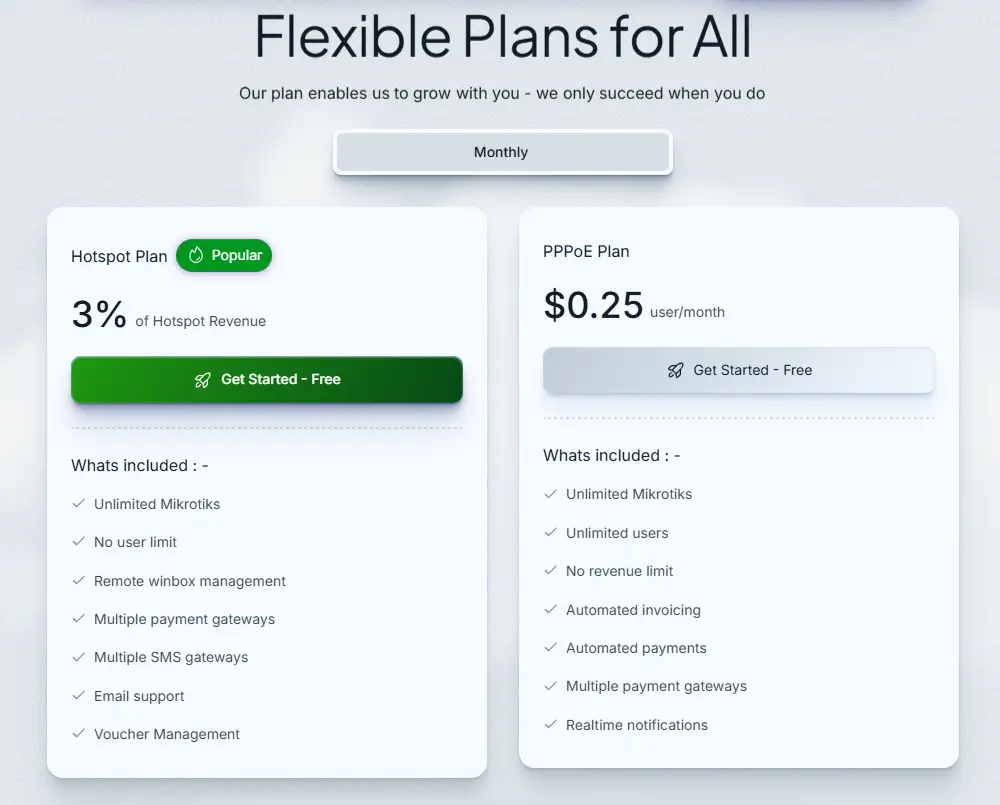
For hotspot operators, the platform charges 3% of your hotspot revenue. If you’re running a PPPoE network, the cost is $0.25 per user per month.
Both plans include unlimited MikroTik devices, multiple payment gateway integrations, multiple SMS gateways, and a 14-day free trial, so you can evaluate the system before committing.
The price isn’t just for billing.
You’re also getting automated payments, remote MikroTik management, customer self-service, package management, real-time reporting, and technical support. Buying separate tools for all these functions would likely cost more and be harder to manage.
From my experience, Centipid offers good value for money. As long as your business is generating revenue, the subscription is easy to justify because the automation saves time, reduces manual work, and helps you serve customers more efficiently.
Centipid is a good choice if you want to automate billing without dealing with a complicated setup. It fits businesses that need reliability, local payment support, and easy day-to-day management.
It’s a great fit for:
It may not be the best choice if:
If your goal is to spend less time managing subscriptions and more time serving customers and growing your network, Centipid is worth considering.
After using Centipid for more than two years, I can confidently say it has been a solid investment for my business. It has automated the tasks that used to consume hours every week, from processing payments to managing customer subscriptions. More importantly, it has been reliable.
Is it perfect? No. There are areas that could improve, especially documentation and some advanced features. But none of those have been serious enough to make me switch to another platform.
What I like most is that Centipid focuses on what matters. It automates billing, works well with MikroTik, supports local payment methods, and scales as your business grows. It doesn’t try to do everything, and that’s one of its strengths.
If you’re running a hotspot business or a small to medium-sized ISP, I’d recommend giving it a try. The 14-day free trial lets you test it with your own network before making a decision.
| Category | Rating |
|---|---|
| Ease of Setup | ⭐⭐⭐⭐☆ (4.5/5) |
| Ease of Use | ⭐⭐⭐⭐⭐ (5/5) |
| Features | ⭐⭐⭐⭐☆ (4.5/5) |
| Performance | ⭐⭐⭐⭐⭐ (5/5) |
| Customer Support | ⭐⭐⭐⭐☆ (4/5) |
| Value for Money | ⭐⭐⭐⭐⭐ (5/5) |
Overall Rating: ⭐⭐⭐⭐⭐ (4.8/5)
Centipid has earned a permanent place in my toolkit. If I were starting another ISP today, it would still be one of the first billing systems I’d consider.
Is Centipid Billing System free?
Centipid offers a 14-day free trial for new ISP accounts. After the trial, pricing depends on the plan you choose. Hotspot operators pay 3% of their hotspot revenue, while PPPoE operators pay $0.25 per user per month.
Does Centipid work with MikroTik?
Yes. Centipid is built to work with MikroTik routers. It supports both Hotspot and PPPoE deployments and can remotely manage multiple MikroTik devices from a single dashboard.
Does Centipid support M-Pesa?
Yes. M-Pesa is one of the platform’s biggest strengths. Customers can pay using M-Pesa, and their accounts are automatically renewed once the payment is confirmed.
Can Centipid manage multiple MikroTik routers?
Yes. Both the Hotspot and PPPoE plans support unlimited MikroTik devices, making it suitable for businesses with multiple sites.
Is Centipid suitable for small ISPs?
Yes. In fact, that’s where it shines. The platform is easy to set up, scales as your customer base grows, and automates many of the daily tasks involved in running an ISP.
Does Centipid replace MikroTik?
No. Centipid is a billing and customer management platform. Your MikroTik router still handles routing, firewall rules, bandwidth management, VLANs, VPNs, and other networking functions.
Is Centipid worth it in 2026?
Based on my experience, yes. If you’re looking for a reliable billing system that integrates well with MikroTik, supports local payment methods, and reduces manual work, Centipid is well worth considering.






No Comments