






Choosing the right Starlink subscription can make a significant difference to the performance and profitability of your WiFi hotspot business or small ISP.
Paying for a plan that is too expensive increases your operating costs, while choosing one with insufficient capacity can lead to slow speeds and unhappy customers.
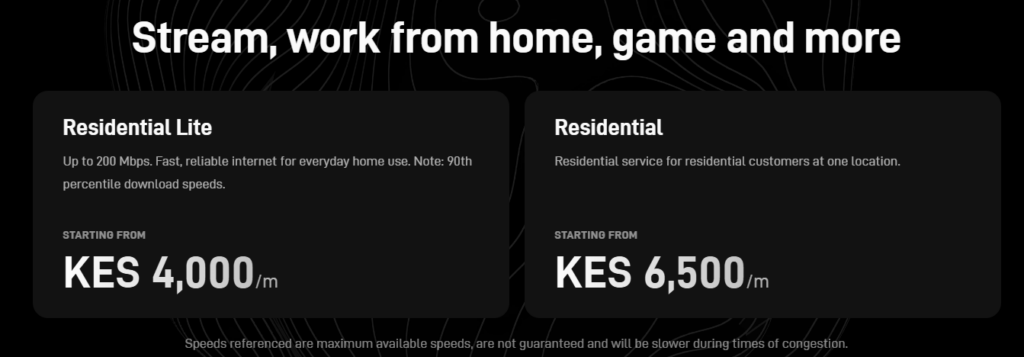
As of 2026, Starlink offers multiple subscription plans. However, only two are practical for most hotspot providers: Residential (KES 6,500/month) and Residential Lite (KES 4,000/month). These plans provide the best balance of speed, affordability and scalability for startups and growing wireless internet businesses.
In this guide, you’ll learn the differences between these two subscriptions, who each plan is best suited for and how to choose the right one based on your budget, customer base and business goals.
A Starlink subscription is the monthly service plan that gives your Starlink hardware access to the internet. Purchasing a Starlink kit only provides the equipment. To use it, you must activate it with an active subscription.
Each subscription includes a specific level of service, such as expected download speeds and network priority. The subscription you choose determines how your connection performs, especially during periods of high network demand.
For most WiFi hotspot businesses and small ISPs in Kenya, the decision comes down to two subscriptions:
One advantage of Starlink is its flexibility. If your business grows, you can upgrade from Residential Lite to Residential without replacing your Starlink kit. Likewise, if your bandwidth requirements decrease, you can switch to a lower-cost plan, subject to the plans available in your region.
The subscription is only one part of your internet setup. To build a reliable hotspot business or small ISP, you’ll also need a capable router, quality wireless access points and a billing system that can manage your customers effectively.
Starlink offers several subscription plans in Kenya. However, Residential and Residential Lite are the only plans we recommend for most WiFi hotspot businesses and small ISPs. The other plans are designed for different use cases and can become expensive for internet service providers.
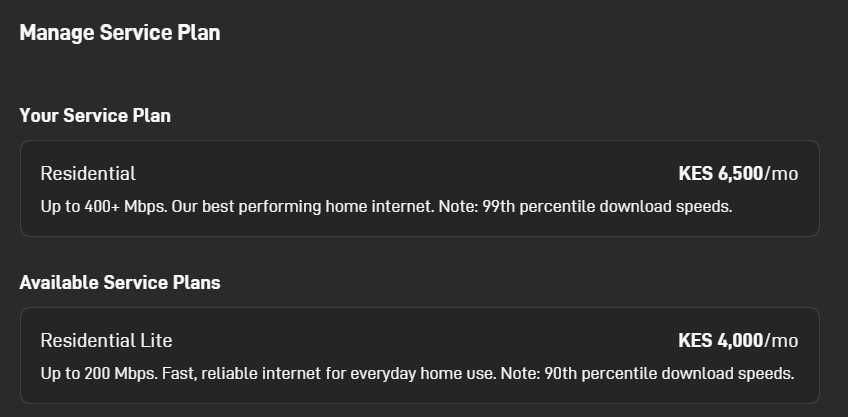
The Residential plan is the best option for most hotspot businesses. It offers download speeds of up to 400+ Mbps and delivers the best performance on Starlink’s residential network.
Best for:
Pros
Residential Lite is ideal for operators starting a hotspot business. With speeds of up to 200 Mbps, it provides enough bandwidth for smaller networks while keeping monthly costs low.
Best for:
Pros
The following Starlink bundles are available in Kenya but are not recommended for most hotspot businesses or small ISPs.
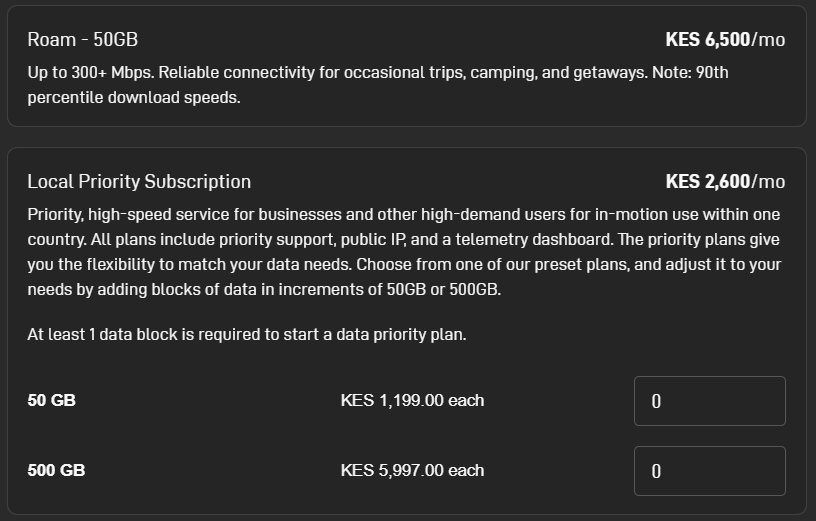
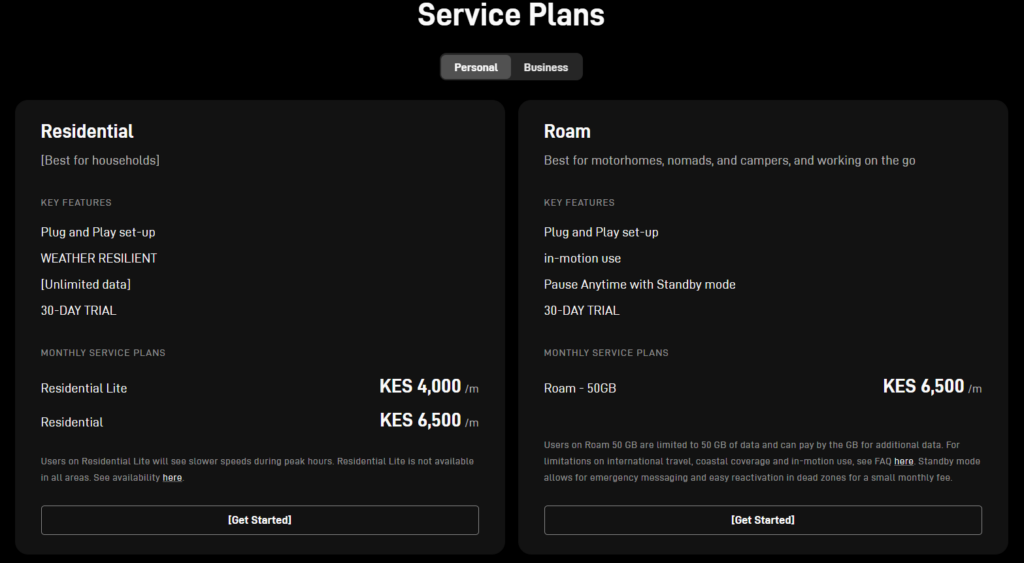
Starlink Roam 50GB (KES 6,500/month)
Roam 50GB is designed for travellers, campers and users who need internet in different locations. The subscription includes only 50GB of priority data, after which speeds may be reduced or additional charges may apply.
For a hotspot business, 50GB can be exhausted within a few days, or even a few hours, depending on customer usage. At the same monthly price as the Residential plan, it offers far less value.
Not recommended because:
Starlink Local Priority
Local Priority is intended for businesses that require priority traffic, public IP addresses and advanced network features.
The base subscription costs KES 2,600 per month, but you must also purchase priority data blocks:
Once your priority data is used, you’ll need to purchase additional data blocks. For hotspot businesses with dozens of users, this can become costly.
Not recommended because:
Starlink Global Priority (KES 23,000/month)
Global Priority is designed for multinational businesses, maritime operations and organizations that require internet across multiple countries.

Like Local Priority, it requires purchasing priority data blocks:
For a small ISP or hotspot business, the monthly subscription and data costs are difficult to justify.
Not recommended because:
For nearly all small ISPs and WiFi hotspot businesses, Residential and Residential Lite provide the best value.
They offer predictable monthly costs without requiring you to buy additional data blocks, making them easier to budget for and more practical for serving multiple customers.
If you’re choosing between these two plans, the decision comes down to your budget and the size of your hotspot network.
| Feature | Residential | Residential Lite |
|---|---|---|
| Monthly Cost | KES 6,500 | KES 4,000 |
| Maximum Download Speed | Up to 400+ Mbps | Up to 200 Mbps |
| Performance | Better overall performance | Good for light to moderate usage |
| Best For | Growing hotspots and small ISPs with many PPPoE clients. | Startup hotspot businesses |
| Scalability | Excellent | Good, but may require an upgrade as your business grows |
Choose Residential if:
Choose Residential Lite if:
Our Verdict
For most hotspot businesses, Starlink Residential offers the best long-term value. The additional KES 2,500 per month gives you higher speeds and more capacity to handle a growing number of users.
If you’re launching on a tight budget, Residential Lite is a sensible starting point. Once your hotspot begins generating consistent income, upgrading to Residential is the logical next step.
Choose your subscription based on your current customer base and expected growth.
Choose Residential Lite if you:
Choose Residential if you:
| Business Type | Recommended Packages |
|---|---|
| Startup hotspot | Residential Lite |
| Apartment hotspot | Residential |
| Estate or village hotspot | Residential |
| School or hostel | Residential |
| Small ISP | Residential |
For most WiFi hotspot businesses and small ISPs, Starlink Residential is the best choice. The higher monthly fee delivers better performance and more room for growth.
If you’re launching on a tight budget, start with Residential Lite and upgrade when your customer base increases.
Source: Starlink, a division of SpaceX.
There is no fixed limit to the number of users a Starlink connection can support. It depends on factors such as internet usage, bandwidth limits, network design and the equipment you use.
The table below shows practical estimates for a well-configured hotspot network.
| Starlink Packages | Recommended Active Users | Suitable For |
|---|---|---|
| Residential Lite | 50 to 80 | Small hotspots, PPPoE, shops, apartments |
| Residential | 50 to 100+ | Apartments, estates, PPPoE, villages and small ISPs |
A properly configured MikroTik router with bandwidth management can support even more connected devices by ensuring no single user consumes excessive bandwidth.
Tip: Focus on active users, not connected devices. A hotspot may have 200 registered users, but only a fraction are typically online at the same time.
Your Starlink subscription is only part of the network. The right equipment determines how many customers you can serve and how reliable your service will be.
A MikroTik router is recommended for bandwidth management, hotspot authentication and traffic control.
Recommended models:
Use business-grade access points designed for outdoor deployments.
Recommended options:
Billing System
A billing platform automates user authentication, voucher generation, payments and customer management.
Popular options include:
Backup Power
Use a UPS or inverter to keep your Starlink dish, router and access points running during power outages. Vestwoods 1kWh and 2kWh can sustain both the Standard and Mini Starlink Kit for over 12 hours+.
Invest in quality networking equipment from the start. A reliable router, business-grade access points and a good billing system will have a greater impact on your network than simply buying a faster Starlink subscription.
Avoiding these mistakes can save you money and improve your network performance.
A cheaper plan isn’t always the best value. Residential Lite is ideal for small networks, but growing hotspot businesses often benefit more from the additional capacity of the Residential plan.
Roam 50GB, Local Priority and Global Priority include limited data bundle allowances. A busy hotspot can exhaust these data bundles quickly, making them expensive for serving multiple customers.
Connecting more customers than your Starlink subscription can comfortably support leads to slow speeds and poor user experience. Grow your customer base gradually or upgrade your subscription when needed.
Your Starlink connection is only as good as the equipment behind it. Use a business-grade router, outdoor access points and a reliable billing system to maximize performance.
Power outages will take your entire network offline if your Starlink dish and networking equipment don’t have backup power.
Without bandwidth limits, a few heavy users can consume most of your internet connection. Configure bandwidth management to ensure every customer gets a fair share.
Is Starlink Residential good for a WiFi hotspot business?
Yes. Starlink Residential is the best option for most WiFi hotspot businesses and small ISPs. It offers the best balance of speed, performance and monthly cost.
Is Starlink Residential Lite enough for a hotspot business?
Yes, if you’re just starting out or serving a small number of customers. As your customer base grows, you can upgrade to the Residential plan.
Can I upgrade from Residential Lite to Residential?
Yes. Starlink allows you to change your subscription without replacing your Starlink hardware.
Which Starlink subscription offers the best value?
For most operators, the Residential plan offers the best value because it provides higher speeds and better capacity for only KES 2,500 more per month than Residential Lite.
Does Starlink have unlimited data?
Residential and Residential Lite do not have fixed monthly data caps like Roam 50GB or Priority data package. However, Starlink may apply fair use policies or network management during periods of congestion.
Should I choose Roam or Priority for my hotspot business?
Generally, no. Roam 50GB, Local Priority and Global Priority are designed for mobility and enterprise applications. Their metered data makes them expensive for serving multiple hotspot users.
Can one Starlink connection support an entire hotspot business?
Yes. A single Starlink connection can support dozens of users when paired with a business-grade router, quality access points and proper bandwidth management. The exact number depends on user activity and your network design.
Do I need a Business Starlink subscription to run a hotspot?
No. Most small hotspot businesses and ISPs can operate effectively using the Residential or Residential Lite plan. Business and Priority plans are intended for organizations that require enterprise features and priority data.
Related Articles
Continue learning with these helpful guides:
Need help choosing a Starlink plan or setting up your hotspot business?
Join the WiFi Mtaani Starlink WhatsApp Community, where thousands of hotspot operators, WISP owners and Starlink users share tips, troubleshoot issues and discuss the latest Starlink updates.
Join the community: https://chat.whatsapp.com/E9OCvfUsY4LLS8NcuZpsSO
Whether you’re starting your first hotspot or expanding your ISP, you’ll find practical advice from people using Starlink every day.
For most WiFi hotspot businesses and small ISPs, Starlink Residential is the best subscription. It delivers the right balance of speed, capacity and monthly cost, making it suitable for both new and growing networks.
If you’re starting with a limited budget, Starlink Residential Lite is a solid alternative. It keeps your operating costs low while giving you the flexibility to upgrade as your business grows.
Choose a subscription that matches your current needs, invest in quality networking equipment and scale your network as your customer base increases. That’s the most cost-effective way to build a reliable hotspot business with Starlink.






No Comments